 CalendarBar
MeetingBar for Windows
MeetingBar doesn't run on Windows. CalendarBar does.
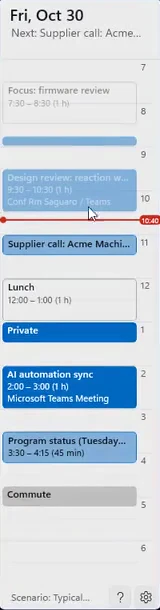
MeetingBar is a Mac app. CalendarBar keeps your day on screen in Windows 11 and joins your next call in one click.
How they compare.
| MeetingBar | CalendarBar | |
|---|---|---|
| Runs on | macOS | Windows 11 |
| Sits in | The menu bar | A thin bar at the left or right screen edge |
| Shows | Your next meeting | Your whole day on a timeline |
| Joins calls | Yes | One click for Teams, Zoom, Google Meet and Webex |
What you get on Windows.
- The whole day
- A coloured block marks each meeting and a red line marks now. Hover and the day opens with titles and times.
- Hidden from screen sharing
- On by default. Your schedule stays out of Teams and Zoom shares and recordings.
- Your calendars
- Classic Outlook, Microsoft 365, Google Calendar, Outlook.com and iCloud, merged into one timeline.
On a Mac?
Stick with MeetingBar. It's built for the menu bar, and CalendarBar only runs on Windows 11.
Stop opening your calendar.
Put your whole day at the edge of the screen.
Get it from the Microsoft StoreRequires Windows 11.